Quick-Pill
Dynamic Island for Windows
No AI needed
not yet reviewed by publik. It is live now; the founder has not reviewed this version yet.

How to install Quick-Pill
Every step written out. No terminal experience needed. Pick your setup.
README
Open in GitHubQuick Pill
Dynamic Island, but for everyone
Quick Pill is a desktop application that recreates Apple's Dynamic Island experience on Windows. It's a notification hub, widget system, and smart assistant that stays out of your way until you need it.


Features
Core Functionality
- Persistent Always-On-Top — Elevated screen-saver priority that retains focus across multi-window switching and full-screen apps
- Multi-Monitor & Desktop Support — Island syncs seamlessly across all desktops and monitors
- Dynamic Stadium Pill Physics — Smooth Framer Motion spring morphing (
stiffness: 340, damping: 28) between Still (semicircular 20px pill) and Large modes (32px pill) with boundary-confined page transitions - Media Controls & Clean Titles — Now playing preview with clean app naming (Spotify/Apple Music) and un-cropped marquee titles
- Quick App Launcher & Workspace Switcher (Tab 14) — Search and launch installed Windows applications with real icons, switch running application windows with native Win32 window restoration, pin favorites, and switch contextual productivity workspaces with launch profiles and preview safety
- Quick Notes & Contextual Capture (Tab 15) — Instant quick-capture composer with debounced autosave and crash recovery, searchable notes inbox with tags and filters, contextual clipboard capture with large-content guard, and non-destructive note-to-task conversion
- Per-App Audio Mixer (Tab 12) — Native Windows Core Audio WASAPI mixer to control individual application volume levels, mute/unmute apps, inspect real-time peak audio indicators, and select active audio endpoints
- Universal Progress Island (Tab 13) — Intelligent background operations consolidation layer tracking file copying/hashing, download tasks, and app update progress directly in the Dynamic Island
- Customizable Themes — Multiple themes including Win95, SleekBlack, and custom RGB colors
- Quick Apps — One-click access to 4 apps of your choice
- Keyboard Shortcuts — Quick navigation with
Ctrl + [Number]shortcuts
Information & Alerts
- Smart Notification Actions (Tab 5) — Real app icons, WhatsApp/VoIP call cards with answer/dismiss actions, inline replies, local snooze presets (5m, 15m, 30m, 1h), grouped multi-message stacks, low-priority collapsing, privacy preview masking, and dismissal undo buffer
- Apple Battery Hub (Tab 11) — Dynamic Island battery dashboard with 60 FPS right-to-left fluid liquid wave canvas engine, buoyant micro-bubbles, discharge drain metrics, and duration estimation
- Weather Display (Tab 1) — Real-time weather information & forecasts
- Battery Alerts — Charging status and low battery notifications
- Hardware & System Alerts — Real-time CPU/RAM stats, USB connection alerts, Bluetooth, and Keyboard lock (Caps/Num/Scroll) indicators
Smart Features & Productivity
- Lock-Screen & Background Timers (Tab 10) — Wall-clock synchronized countdown timers that continue without pausing when Windows locks or goes to sleep
- Silent Background Updates — Automatically detects, downloads, and silently installs updates via NSIS with configurable settings
- Minimalist Tasks Manager (Tab 8) — Apple / Things 3 style task list with circular check buttons, smooth scrolling, and single-capsule input bar
- Timer & Presets (Tab 10) — Quick preset timer chips (15m, 30m, 60m, 100m) and custom time picker
- Browser Search (Tab 0) — Instant web search integration
- Clipboard Manager (Tab 7) — Access and manage your copied text snippets
- Compact Calendar (Tab 4) — Monthly interactive calendar with zero-margin height optimization
How to Use
The Three Modes
Still Mode — The default idle state
- Compact display
- Minimal visual footprint
- Ready to expand on interaction
Quick Mode — Hover over the Island
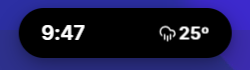
- See current time, weather, and battery status
- If music is playing, view now-playing info
- Hover playback controls for music
Large Mode — Click the Island
- Full interface with all tabs
- Switch tabs with arrow keys or mouse scroll
- Access all features and settings
- Default view for focused work
Using Tabs
- Arrow Keys — Navigate between tabs
- Mouse Wheel — Scroll horizontally between tabs
- Ctrl + Number — Jump to a specific tab
Build & Development
Prerequisites
- Node.js 16+ and npm
- Platform-specific build tools:
- Windows: Visual Studio Build Tools
Development Setup
# Clone the repository
git clone https://github.com/Abrar Nabil/Quick-Pill.git
cd Quick-Pill

# Install dependencies
npm install

# Start development server
npm start
The development server will launch Quick Pill with hot reload enabled. Press Ctrl+R to refresh the app.
Build for Current OS
npm run make
Build for Specific Platforms
Windows (x64)
npm run make -- --platform=win32 --arch=x64
Contributing
We welcome contributions!:
- Bug reports and fixes
- New features and improvements
- Documentation updates
- Theme designs
- Ideas and suggestions
Please check CONTRIBUTING.md for guidelines.
License
Quick Pill is open source and available under the MIT License.