PixelRevive
A tool that lets you unpixelate, unblur and enhance pictures for free
No AI needed
not yet reviewed by publik. It is live now; the founder has not reviewed this version yet.

How to install PixelRevive
Every step written out. No terminal experience needed. Pick your setup.
README
Open in GitHubPixelRevive
A browser-based image restoration studio — depixelate mosaic/censored images, remove Gaussian blur via real deconvolution, and sharpen detail. 100% client-side workflow, 100% honest about what physics allows.


⚠️ The honest truth about "100% accuracy"
You may have come here looking for a tool that restores pixelated or blurred images "with 100% accuracy". No such tool exists, and none ever will — not this one, not a commercial one, not a future AI one. Here is why, stated up front so you can calibrate your expectations:
- Pixelation and blur are lossy operations. They average away spatial detail, and information that has been destroyed cannot be recreated — only plausibly guessed. Many different original images produce the exact same pixelated/blurred result, so "the original" is mathematically unrecoverable (the inverse problem is ill-posed).
- What a good tool can do is invert every part of the degradation that is mathematically recoverable, and reconstruct the rest as faithfully as the surviving signal allows. That is exactly what PixelRevive does — with measurable before/after metrics, not marketing claims.
- What AI-based tools do differently is hallucinate plausible detail (faces, text, textures). The result can look convincing while being factually wrong. PixelRevive deliberately stays in signal-processing territory: everything it shows you was actually recovered from your image.
If someone promises 100% recovery, they are selling you a guess and calling it ground truth.
What it does
| Mode | What happens under the hood | Best for |
|---|---|---|
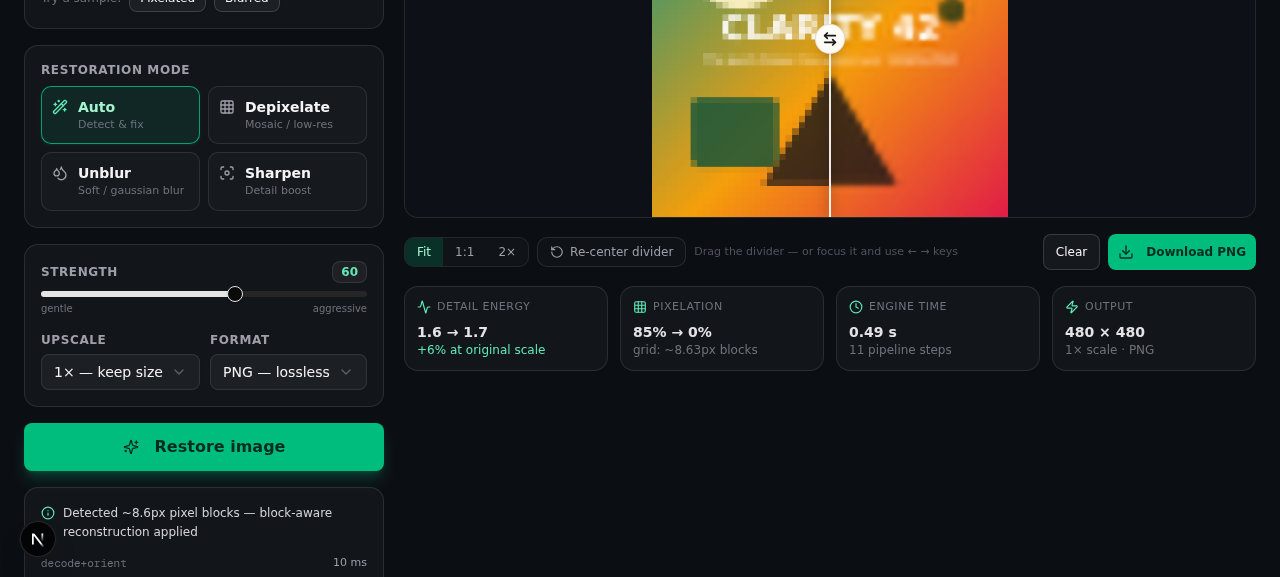
| Auto | Detects pixelation block size + blur level, routes to the right pipeline | Unknown degradation |
| Depixelate | Grid-aware mosaic reconstruction: block detection → area downsample → Lanczos super-sampling → iterative back-projection → edge-aware bilateral | Censored/mosaic images, low-res upscale, pixel art |
| Unblur | Richardson-Lucy deconvolution on the luma plane with a separable Gaussian PSF | Gaussian/out-of-focus softness |
| Sharpen | Luma-only unsharp masking with halo control | Mildly soft photos, screenshots |
Every run returns:
- The restored image (PNG / JPEG / WebP, 1× / 2× / 4× upscale)
- A process report (JSON,
X-Process-Reportheader): detected pixel block size, Laplacian variance and total-variation before/after, per-step timings - An interactive before/after wipe slider so you can verify the change pixel-by-pixel instead of trusting a thumbnail
Using the studio
- Drop, paste, or upload an image (up to 25 MB).
- Pick a mode — Auto analyzes the image and picks a pipeline for you.
- Adjust strength (0–100) and upscale (1× / 2× / 4×).
- Inspect the result with the comparison slider (drag to wipe, arrow keys work too), zoom to Fit / 1:1 / 2×, then download in your chosen format.
No account, no upload to third parties — the image is processed by the server you're running (or self-hosting) and immediately discarded.
How it works
PixelRevive is not a wrapper around someone's ML model. The restoration
engine is hand-rolled signal processing in pure TypeScript
(src/lib/algorithms.ts) orchestrated by
sharp for codec work and resizing.
1. Pixel-block detection
A pixelated image is a low-resolution grid that was scaled up with nearest-neighbor. The detector scans horizontal and vertical boundary differences, clusters the intervals between equal-value boundaries, and finds the spacing that explains them harmonically (phase-free, so it works regardless of where the grid lands, and on non-integer ratios like 8.57 px). Horizontal and vertical estimates must agree within ±0.75 px before a mosaic is declared.
2. Grid-aware depixelation
Once the block size b is known, the original pixel grid is recoverable
exactly:
pixelated image
   → area-downsample to the true grid (b×b cells → 1 px)
   → Lanczos3 super-sample to target size
   → iterative back-projection (2–3 passes: re-blur the estimate,
     add the difference back — recovers high-frequency content)
   → soft bilateral filter (flattens grid residue, keeps real edges)
   → scale-aware unsharp (σ scaled by the upscale factor)
3. Richardson-Lucy deblurring
Gaussian blur is modeled as convolution with a known PSF. PixelRevive runs Richardson-Lucy — the classic maximum-likelihood deconvolution — on the luma plane only (chroma is smoothed, avoiding color fringe artifacts), with edge-aware handling to stop ringing at borders. Strength maps to iteration count; the pipeline gates it at 6 MP to stay responsive.
4. Auto routing & metrics
Auto mode measures Laplacian variance (blur) and the boundary-harmonic score (mosaic), then composes the right passes. Every step is timed and reported.
upload → analyze (block size, LV, TV) → [depixelate | deconvolve | sharpen]
       → enhance → encode (png/jpeg/webp) → response + X-Process-Report
API
The UI is a thin client over one endpoint — script it with curl:
curl -X POST http://localhost:3000/api/enhance \
  -F "image=@photo.jpg" \
  -F "mode=unblur" \
  -F "strength=70" \
  -F "upscale=2" \
  -F "format=png" \
  -o restored.png -D headers.txt
# headers.txt contains X-Process-Report: <URI-encoded JSON>
| Endpoint | Method | Parameters |
|---|---|---|
/api/enhance | POST | multipart form: image (file, ≤25 MB), mode = auto|depixelate|unblur|sharpen, strength (0–100, default 60), upscale (1/2/4), format = png|jpeg|webp |
/api/sample | GET | ?kind=pixelated|blurred — generates synthetic test images |
Errors: 400 unreadable/empty image, 413 over 25 MB, 500 processing
failure — all with a JSON { "error": "..." } body.
Architecture
src/
├── lib/
│   ├── algorithms.ts     # pure DSP kernels — no sharp/DOM, fully testable
│   ├── pipeline.ts       # sharp orchestration, mode routing, MP gates, report
│   ├── types.ts          # EnhanceMode / EnhanceParams / EnhanceReport
│   └── utils.ts          # cn() and friends
├── app/
│   ├── page.tsx          # studio UI (modes, sliders, zoom, metrics, report)
│   ├── layout.tsx        # fonts, metadata, toaster
│   ├── globals.css       # Tailwind v4 theme
│   └── api/
│       ├── enhance/route.ts   # POST → runEnhance() → image + report header
│       └── sample/route.ts    # synthetic degraded test images (SVG → sharp)
└── components/
    ├── comparison-slider.tsx  # clip-path before/after wipe (pointer + a11y)
    └── ui/                    # shadcn/ui primitives (button, slider, select...)
Safety gates in the pipeline: inputs are capped at 3200 px on the long side, outputs at 24 MP; deconvolution and bilateral passes degrade gracefully above their MP thresholds instead of OOM-ing.
Deployment
Any Node 20+ host works:
npm run build && npm start # plain Next.js server
Or Docker:
FROM node:22-slim
WORKDIR /app
COPY package.json ./
RUN npm install
COPY . .
RUN npm run build
EXPOSE 3000
CMD ["npm", "start"]
Known limitations
Being honest about the ceiling is part of the design:
- Truly destroyed detail stays destroyed. A 12×12 censored face is a 12×12 array of numbers — no algorithm can conjure the pixels inside it. PixelRevive sharpens block boundaries and gradients, it cannot invent identity-level detail (and won't pretend to).
- Gaussian-family blur only. Motion blur (camera shake) needs a directional PSF — a good first contribution, see the roadmap.
- Text on tiny mosaic cells becomes legible only when the underlying grid actually sampled it; heavily censored text remains unreadable, as it should.
- JPEG artifacts interact with mosaic detection; extreme compression may reduce detection accuracy.
Responsible use
Restoration tools can be misused to attempt de-censoring of private or sensitive imagery. PixelRevive cannot recover information that was destroyed, and you are responsible for complying with the law and other people's privacy when processing images that aren't yours.
Roadmap
- Motion-blur PSF (directional Richardson-Lucy)
- Wiener-filter deconvolution as an alternative to RL
- Optional neural backend (Real-ESRGAN) behind a feature flag — clearly labeled as plausible detail, not recovered detail
- Web Worker client-side mode (fully offline processing)
- Batch processing & CLI
Contributing
PRs are welcome — see CONTRIBUTING.md for the project layout and the "keep the kernels pure" rules.
License
MIT © 2026 PixelRevive Contributors
Acknowledgments
- sharp — fast image codec & resize workhorse
- Next.js, Tailwind CSS, shadcn/ui, Radix UI, lucide, framer-motion
- Richardson (1972) & Lucy (1974), for the deconvolution that still beats hype