Lidless
Keep your Mac running with the lid closed so your AI coding sessions never die
No AI needed
How to install Lidless
Every step written out. No terminal experience needed. Pick your setup.
README
Open in GitHubLidless (publik fork)


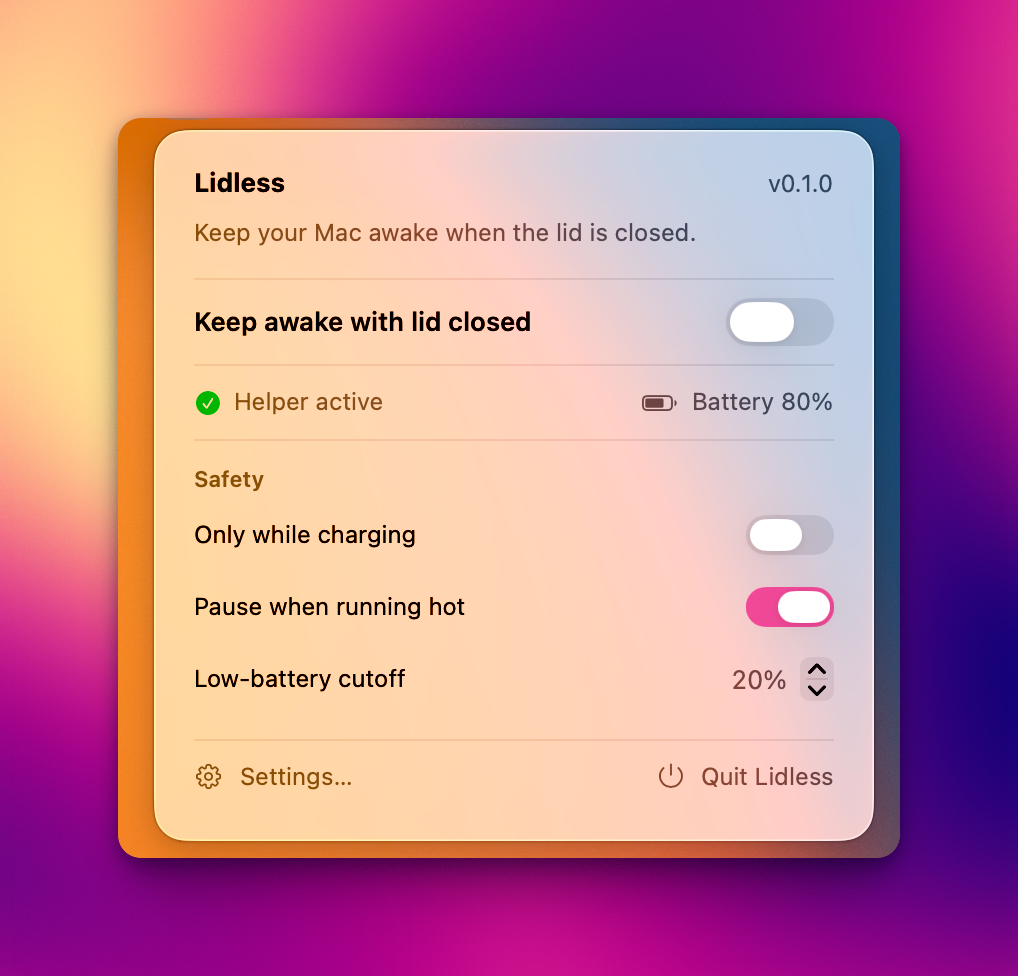
A tiny macOS menu-bar app that keeps your Mac running even with the lid closed — so coding agents (Claude Code, Codex, etc.) keep working while you move around.
Open source under the MIT License. Lidless is by Nghia Luong; this fork is maintained for publik and ships its own signed, notarized builds.
What this fork fixes
"I installed Lidless and the menu never opens." On a MacBook with a crowded menu bar, macOS puts the newest status item leftmost — which on notched MacBooks is behind the camera housing. The icon exists (accessibility can press it) but no click can reach it, and the first-run Welcome window opened behind whatever you had in front, so the app looked dead. Reproduced on a fresh 0.1.3 install with 12 other menu-bar items: the Lidless item sat at x 754–790 on a bar whose notch spans x 663–848.
- Notch detection. Lidless now checks where its status item actually landed
(
MenuBarIconMonitor, pure geometry inMenuBarIconVisibility) and says so — at the end of onboarding, in Settings, and inside the menu itself. - ⌃⌥L opens the menu from anywhere. A global shortcut (Carbon hotkey, no Accessibility permission needed) so the menu is reachable even when the icon isn't. Onboarding and Settings also get an Open the Lidless menu button.
- The Welcome window shows up in front. Since macOS 14 an accessory app can't force activation; the window is now ordered front regardless.
- No app-modal alert from a timer. "Restart to finish connecting the helper" could pop up to 30 s after approval as an app-modal alert, freezing the menu-bar icon (possibly behind another app). It's a sheet on our own window now.
Everything else — the root helper, watchdog, safety guards, timer, Sparkle — is
upstream Lidless, unchanged. Bundle id is com.publikhq.lidless (helper
com.publikhq.lidless.helper), signed with publik's Developer ID, updates from
this repo's own appcast.
Features
- One-click keep awake with the lid closed (menu bar toggle).
- Privileged background helper (
SMAppService) so toggling never asks for a password. - Watchdog: if the app crashes or is force-quit, the helper auto-restores normal sleep — the Mac can't get stuck awake.
- Safety guards: pause when running hot, only-while-charging, and a low-battery cutoff.
- Auto-off timer: optionally turn keep-awake off after 15 min – 4 hours, with a live countdown.
- Automatic updates via Sparkle — EdDSA-signed appcast, notarized DMGs.
- Launch at login, and a clean menu with battery/power status.
How it works
macOS sleeps when you close the lid. The reliable way to override that on Apple Silicon
is the SleepDisabled flag in IOPMrootDomain (what sudo pmset -a disablesleep 1 sets).
caffeinate does not prevent lid-close sleep — only this flag does.
The app talks to a root helper over XPC; the helper flips the flag with no admin prompt and runs a heartbeat watchdog. If the app stops checking in (>90s), the helper restores sleep.
Architecture
Lidless— SwiftUIMenuBarExtraapp (macOS 13+), not sandboxed,LSUIElement.LidlessHelper— root LaunchDaemon, registered viaSMAppService, servesLidlessHelperProtocolover XPC. Embedded atContents/MacOS/LidlessHelperwith its plist inContents/Library/LaunchDaemons/.Sources/Shared— pure, unit-tested logic: pmset parsers, watchdog, safety evaluator, settings.
App icon
The app icon and the menu-bar glyphs are committed assets under
Resources/Assets.xcassets/ (AppIcon.appiconset plus the MenubarLaptop /
MenubarLaptopActive template imagesets that mark keep-awake off / on).
scripts/make_iconset.sh is kept as a helper for regenerating an icon set from a
single master if you want to swap the artwork:
bash scripts/make_iconset.sh # renders icon + emits Assets.xcassets/AppIcon.appiconset
Release
Signed + notarized DMG plus the EdDSA-signed Sparkle appcast (needs a Developer ID cert, a notarytool keychain profile, and the Sparkle signing key in the keychain):
./scripts/release.sh # archive → export → notarize → staple → DMG → appcast → publish
Publishes the DMG to a GitHub Release and writes the feed to docs/appcast.xml
(served at the SUFeedURL in project.yml).
Milestones
- M0 — spike, verified lid-closed on real Apple Silicon (
scripts/lidless.sh). ✅ - M1 / M1.5 — menu-bar app + privileged helper + XPC + watchdog. ✅
- M2 — safety preferences (thermal / charging / battery) + persistence. ✅
- App complete — icon, launch-at-login, onboarding, About, release pipeline. ✅
- Auto-update — Sparkle with an EdDSA-signed appcast, shipped from
release.sh. ✅ - Later — signed runtime verification on device.
- publik fork — hidden-icon detection, ⌃⌥L, front Welcome window, non-blocking helper prompt. ✅
Safety
Running with the lid closed under heavy load can heat the machine and drain the battery. Keep it plugged in and ventilated. The safety guards auto-pause on heat / low battery, and a reboot always resets the underlying flag.
To report a security issue, see SECURITY.md.
Support
Lidless is free and open source. If it saves you some hassle, you can buy me a coffee on Ko-fi ☕ — completely optional, and much appreciated.
License
MIT © 2026 Nghia Luong. Fork changes © 2026 publik, same license.