FTU Schedule Sync
Chromium extension that fetches FTU class schedule to make life a bit easier
AI runs online
not yet reviewed by publik. It is live now; the founder has not reviewed this version yet.
by 
Where FTU Schedule Sync’s AI runs, and what it costs
Prices are for one typical use: one request of about 1,500 words sent and 375 words back. A higher quality score is better.
On your computer
FTU Schedule Sync has no option to run its AI on your computer.
publik API
- Price
- $0.0100 per use, $10.00 per 1,000 usespublik-balanced, the default level
- Quality
- MiMo-V2.6-Pro: 46
- Setup
- Not built into FTU Schedule Sync yet. A publik API key works wherever FTU Schedule Sync takes an OpenAI-compatible address.
Your own key
- Price
- $0.0013 per use, $1.31 per 1,000 usesMiMo-V2.6-Pro at OpenRouter’s list price, before its fee for buying usage
- Quality
- MiMo-V2.6-Pro: 46
- Setup
- Open a provider account, add a card, paste the key into FTU Schedule Sync.
Quality and price, side by side
| Model | Quality | Per 1,000 uses |
|---|---|---|
| On your computer (Ollama, 4-bit download size) | ||
| Granite 4.2 3B2.2 GB | 9 | $0 |
| Phi-4 Mini2.5 GB | 6 | $0 |
| Llama 3.1 8B4.9 GB | 7 | $0 |
| gpt-oss 20B14 GB | 9 | $0 |
| Gemma 4 31B20 GB | 19* | $0 |
| Qwen3.5 35B-A3B24 GB | 19* | $0 |
| publik API | ||
| publik-fastGLM-5.3 Flash | 42 | $1.00 |
| publik-balancedMiMo-V2.6-Pro · FTU Schedule Sync | 46 | $10.00 |
| publik-smartGPT-6 Sol | 48 | $18.00 |
Quality: Artificial Analysis Intelligence Index v4.3.2, read 2026-09-22 (publik API models 2026-09-25); * = estimated by Artificial Analysis. Sizes: the Ollama library, read 2026-09-22.
What you pay for
- On your computer: nothing per use. You pay in disk space, memory and electricity, at lower quality.
- publik API: publik’s published price for each use, in dollars, from your publik balance. It is above the model’s cost; the difference runs publik and pays the app’s builder.
- Your own key: the provider’s price, billed to an account you keep with the provider.
How to install FTU Schedule Sync
Every step written out. No terminal experience needed. Pick your setup.
README
Open in GitHubEN - FTU Schedule Sync
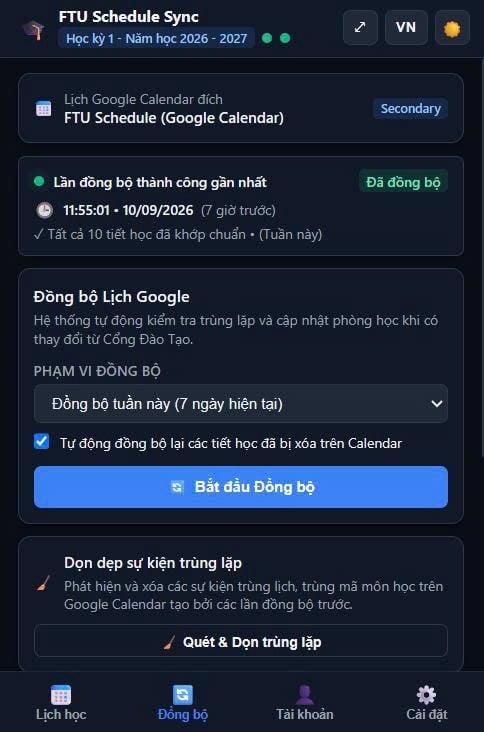
A completely free, client-side browser extension to synchronize FTU class schedules with Google Calendar without relying on third-party servers.
Features
- Direct API Sync: Connects directly to
qldt.hcmc.ftu.edu.vnto fetch the schedule. No intermediaries. - Universal OAuth2: Uses standard
launchWebAuthFlowto support Edge, Brave, and other Chromium forks. - Auto-Login: Gracefully heals expired sessions by running a headless login routine in an offscreen document.
- Offline Fallback: Drag and drop
Export_TKB.xlsxto generate standard.icscalendar files. - Theme Support & Localization: English/Vietnamese toggles and Dark/Light mode support.
Development
Run tests:
npm install
npm run test:ui
VI - FTU Schedule Sync
Tiện ích mở rộng trình duyệt hoàn toàn miễn phí, xử lý phía client để đồng bộ lịch học FTU với Google Calendar mà không phụ thuộc vào bất kỳ máy chủ bên thứ ba nào.
Cài đặt
- Tải về hoặc clone repository dưới dạng tệp
.zip. - Mở trình duyệt sử dụng nhân Chromium của bạn (Chrome, Edge, Brave, v.v.).
- Điều hướng đến trang quản lý tiện ích (
chrome://extensionshoặcedge://extensions). - Bật Developer Mode (Chế độ dành cho nhà phát triển).
- Nhấp vào Load unpacked (Tải tiện ích đã giải nén) và chọn thư mục chứa dự án này (thư mục gốc nơi đặt tệp
manifest.json). - Liên hệ với chủ sở hữu dự án (chính là tôi) để tôi có thể duyệt email của bạn dưới quyền tester.
Tính năng
- Direct API Sync: Kết nối trực tiếp tới
qldt.hcmc.ftu.edu.vnđể lấy lịch học. Hoàn toàn không qua trung gian. - Universal OAuth2: Sử dụng
launchWebAuthFlowtiêu chuẩn để hỗ trợ Edge, Brave và các bản phân nhánh khác của Chromium. - Auto-Login: Tự động khôi phục mượt mà các phiên đăng nhập hết hạn bằng cách chạy quy trình đăng nhập ngầm (headless) trong offscreen document.
- Offline Fallback: Kéo và thả tệp
Export_TKB.xlsxđể xuất tệp lịch định dạng.icstiêu chuẩn. - Hỗ trợ giao diện & Đa ngôn ngữ: Chuyển đổi qua lại giữa tiếng Anh/tiếng Việt và hỗ trợ chế độ Dark/Light mode.
Phát triển
Chạy kiểm thử:
npm install
npm run test:ui